Showing posts with label MCP1700. Show all posts

4/09/2014

XBee remote temperature sensor

There were some questions over time on how the remote sensors on my XBee network are actually wired up and I discovered that I only showed the sensor as is and never explained the wiring. So now this is done with this post and a breadboard picture made with Fritzing:

Remote temperature sensor with XBee

Hardware
The actual remote sensor has the components just soldered to a stripboard (which works for years now outdoors without any problems). For voltage regulation I use the low quiescent current LDO from Microchip MCP1700-3302E (3.3V, TO-92 style, ~1µA quiescent current consumption). There are 1µF ceramic capacitors both on the raw voltage input and the regulated output (just followed the typical application advice on the datasheet).
The temperature sensor TMP36 is wired to Ground, the Vout is connected to pin 20 of the XBee (AD0/ DIO0/ commissioning button) and Vin is wired to pin 13 (ON/ SLEEP).

The trick with consuming power for the temperature sensor only when the XBee is awake is to wire it to pin 13 (ON/ SLEEP) which is only powered when the XBee is awake.The sensor takes about 50µA when powered and is fast enough to get a temperature measurement while the XBee is not sleeping and takes samples from the AD0-Input (pin 20 XBee).
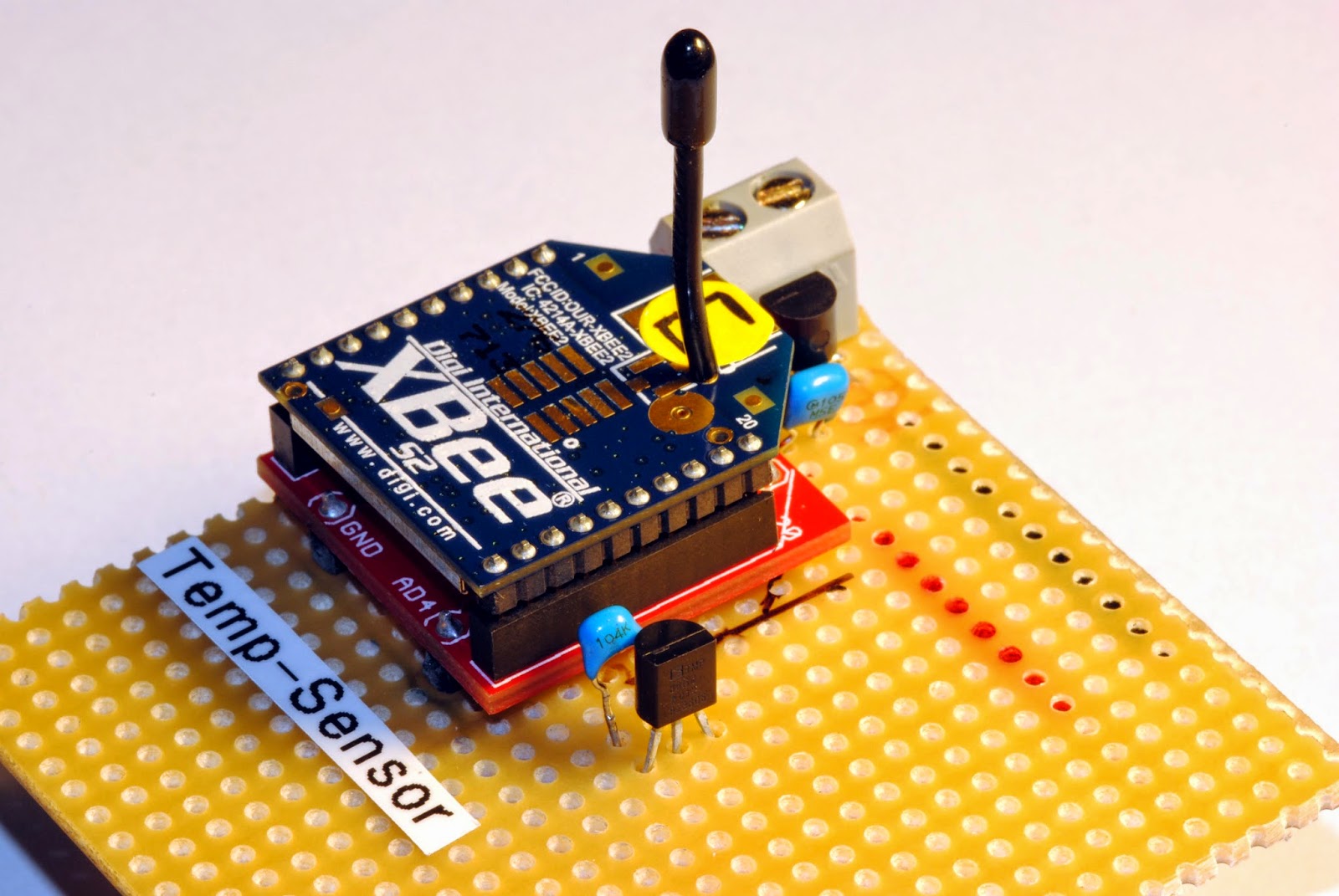
Temperature sensor on stripboard
My sensors are all powered with three AA cells for now and there is enough room from about 4.8 volts when full and fresh to 3.3 volts when it hits the regulated voltage. The sensor even works below that because I think the supply just gets pulled through the voltage regulator when at or below the regulated voltage.
The circuit draws only about 2.3µA when the XBee sleeps and about 40mA when awake but only for a very short amout of time. So the batteries last about are year or longer.


Software
 There is not much software involved beside configuring the logic on the XBee. Those are my settings:

SENDER: (REMOTE SENSOR )
END DEVICE
ATID 2001 (PAN ID)
ATDH 0
ATDL 0
ATD0 2     pin 0 in analog mode with TMP36
ATIR 3E8  sample rate 1000 millisecs (hex 3E8)
ATSM 4     sleep mode cyclic sleep mode
ATSN B     number of sleep periods (hex B = 12 decimal)

ATSP 7D0  sleep period (hex 7D0 = 2000 ms * 10 = 20 seconds)
ATST 7D0  time before sleep 2 seconds (hex 7D0 = 2000 ms)

Output on a custom made display-box for the kitchen with bus schedule
So the sensor is configured to sleep for four minutes (roughly, the oscillator in the XBee circuit seems to be either imprecise or temperature sensitive) then waking up for two seconds, powering the temperature sensor, sampling two times and then go to sleep again. That's all it does. Voila!

There is still room to improve the project. For example one could add an energy harvesting module to the circuit so that no batteries are used to power the device. Another nice feature would be to take a measurement of the actual battery voltage, which could be done with a simple high resistance voltage divider on one of the analog inputs. It might also be clever not to wire the temperature sensor to pin 20 which is also the comissioning button just in case your XBee is reluctant to wake up.

8/05/2013

Power supply for remote sensors

Presentation: How to supply power to microcontrollers/ (remote) sensors with low dropout (LDO) voltage regulators and batteries


"Classic" 7805 Voltage regulator
On August 5 I had a short presentation at the Makerspace Attraktor in Hamburg on how to supply independent power to devices like standalone microcontrollers or (remote) sensors.

 The talk gave some comparison about different low dropout voltage regulators which are by design very well suited for battery powered devices. Decision finding on what parts are most suited and design considerations for independent sensors were explained detailing a remote temperature sensor project I'm working on for about two years now.

XBee temperature sensor


You can find the presentation (in english) here

If you want to stay in touch with new projects or blog entries you can follow me on twitter

7/22/2013

Temperature sensor current consumption

1 year with batteries - temperature sensor project

Temperature sensor with alkaline batteries
Just a quick update on my XBee/ LCD/ temperature sensor project which I originally started in 2011 (last blog entry: XBee temperature sensor project ). I  had to replace the already used battery cells which I put into the sensor about one year ago (August 31 2012) because I got some timeouts on my receiver. The
voltage came down to 3.34 volts and this is a point where the low dropout regulator (MCP1700) keeps quit working sometimes even when the load is only about 25 mA every four minutes when the XBee (end device, sleeping) sends the temperature data to the coordinator.

Voltage development temperature sensor
The three battery cells had a voltage of around 4.1 volts when I started using them for the sensor, so they were already down from their original voltage/ capacity which is around 1.5 volts per cell for unused batteries.
Why did I use used battery cells and not new ones? Because they were lying around and I was wondering how long some spare, already used cells would last during time and different weather conditions. And they lasted almost one year!

The temperature sensor is located outside and we had temperatures of around -15 to +30°C during the year. The chart you see is far from scientificly accurate but gives you a raw picture of the voltage curve for those cells (GP super alkaline).

Next I will replace the batteries with some rechargeable batteries. There are some nice energy harvester ICs on the market - maybe this will be the next power supply for my sensors. Stay tuned.

7/27/2011

Temperature-Sensor Network with RTC and LCD Part V

Wow. More than a month since my last entry. Time is flying by. About 50 days since I started the project and my rechargeable batteries (I had to change the first three after a few days, because one cell was dead) still work in my outside sensor. My RTC is wrong by about 1.6 seconds per day and the deviation is very constant so this error can be erased by software. To compare the temperatures I used a Clock with inside/ outside temperatures I bought some time ago. The temperatures were accurate and so I finally assembled a device which I can buy for about 20 Euros in any electronics store. You might ask why so much effort for such little outcome? Wait for adding an ethernet shield, more Xbees, door bell/ mail alert, light and rain indicators and so on. And everything is broadcasted in the network!

LCD display with date, time, inside- and outside-temperature
For the last part there is unfortunately a lot of code to sift through. I made as many comments as possible - if there are any questions just put it in a comment on the page.

void loop() {

  DateTime now = RTC.now(); // new RTC object named "now"
 
  // get time and date from the RTC DS1307

  int hour = now.hour();
  int minute = now.minute();
  int second = now.second();

  // print time and date on the first line of the LCD
  // and make some adjustments regarding leading zeros
  // time display will change every second

    lcd.setCursor(0, 0);

  if (hour < 10) {
    lcd.print("0");
    lcd.print(hour,DEC);
  }
  else {
    lcd.print(hour,DEC);
  }
  lcd.print(":");
  if (minute < 10){
    lcd.print("0");
    lcd.print(now.minute(), DEC);
  }
  else {
    lcd.print(now.minute(), DEC);
  }
  lcd.print(":");
  if (second < 10){
    lcd.print("0");
    lcd.print(now.second(), DEC);
  }
  else{
    lcd.print(second, DEC);
  }

  int month = now.month();

  lcd.print("  ");
  lcd.print(now.day(),DEC);
  lcd.print(".");
  if (month < 10) {
    lcd.print("0");
    lcd.print(now.month(), DEC);
    lcd.print(".");
  }
  else {
    lcd.print(now.month(), DEC);
    lcd.print(".");
  }

  // wait one second to show off as a "real" clock ;)
  delay (1000);

  // here we are reading the serial port, that means everything that comes from the XBee Coordinator
  // the packet size (I/O Data Sample) is expected to be at least 23 bytes
  if (Serial.available() >= 23) {

    // look for the start byte, in this case I chose part of XBee end device address for easy parsing
    // this is a quick and dirty solution and you are welcome to make a better code for this
    // and of course you have to adjust the code for your XBee end device
    if (Serial.read() == 0x6F) {

      // blink debug LED to indicate when data is received
      digitalWrite(debugLED, HIGH);
      delay(50);
      digitalWrite(debugLED, LOW);

      // read the variables that we're not using out of the buffer
      for (int i = 0; i<9; i++) {
        byte discard = Serial.read();
      }
      // read the two bytes for the analog value
      int analogHigh = Serial.read();
      int analogLow = Serial.read();

      // combine high and low analog value, because it's in two bytes
      analogValue =  analogLow + (analogHigh * 256);

      // calculate temperature from TMP 36
      // 1.2V/ 1024 (10 bit ADC), 0°C is 500 mV, 10mV/ °C temperature coefficient
      float temperature = (((1.171875*analogValue)-500)/10);

      // we take 10 analog temperature samples and calculate the average

      temperature_sample=0; // reset temperature_sample value to zero

      for (int i=0; i<10; i++) {
        // calculate the temperature from the AD22100K
        // 5V/ 1024 (10 bit ADC), 1.375 V at =0°C, 22.5mV temperature coefficient per °C
        temperature_read = (analogRead(0)*0.0048828125 - 1.375) / 0.0225;
        temperature_sample = temperature_sample + temperature_read;
      }
      temperatureInside = (temperature_sample/10);

      // print inside and outside temperature in the second row of the LCD
      // display will only change when data is received

      lcd.clear();

      lcd.setCursor(0, 1);
      lcd.print("IN ");
      lcd.print(temperatureInside,1);
      lcd.print(" OUT ");
      lcd.print(temperature,1);

    }
  }
}


There are still some things to consider and to change in the future. There is for example no adjustment for negative temperatures in the display, the parsing with the XBee address could be improved, the back light could be adjusted by software.

6/12/2011

Offroad: XBee Coordinator API + Arduino UNO + RTC +Temperature Sensor + LCD-Display AND Remote XBee (Sleep Mode with low power consumption) + Temperature Sensor - PART I

What a long headline you might think - but this actually describes very well my longer absence to the blog.

I'm sorry to be again off-road to the book, but before starting with the last Connect-Port experiment in Chapter 7 I still have some things on my to-do list that developed from the preceding chapters of the book.

With the knowledge of all the things learned until now I was eager to implement my first own little project to get a simple temperature sensor network (one outside/ one inside temperature) with a real time clock (RTC) and displaying everything on a LCD-display working.
Base Station (breadboard version)

It's consisiting of:


Base Station:
  • XBee in Coordinator API mode
  • connected to an Arduino UNO
  • Temperature sensor connected to Arduino (AD22100)
  • LCD-Display (16*2) connected to Arduino
  • Real-Time-Clock (RTC DS1307) connected to Arduino 
 Remote Sensor:
Remote Sensor
  • XBee End Device Sleep Mode
  • TMP36 temperature sensor connected
  • Voltage regulator MCP1700 (with very low quiescent current <2µA)
  • running on three AA rechargeable batteries


Part II will be on describing the Base Station.